Table of contents
Packages
Packaging is a convenient feature to synchronise several files without indexing all of them (e.g. to track sequences of images as a single elements). A package is synchronised and tracked as if it were one element. You could think of it like a zipped folder containing a bunch of files.
The packages are folders identified with a trailing slash /:
/regular_folder  -- this folder is synchronized as an empty directory
/package_folder/ -- this folder is synchronized along with its content
Packages behave as follows:
- A package is synchronised along with the files directly contained in the folder (packages don't recurse in sub directories if they exist)
- You can have nested packages or have some indexed files within the packages. If this happens, the indexed file will be synchronised either with the package or alone, whatever comes first in the synchronization queue.
Publishing packages using the API
The packages are published using a trailing slash in the path to the folder. Here is an example with an API call to the publish method using Python:
project.publish({
    "_id":"/folderpack/",
    "origin":"source_site",
    "comment:"synchronized with files inside"
})
Please see the API Reference for details.
Detection of packages using automated scans
The packages can be detected using detection pattern rules that can be edited from your tracker's interface:
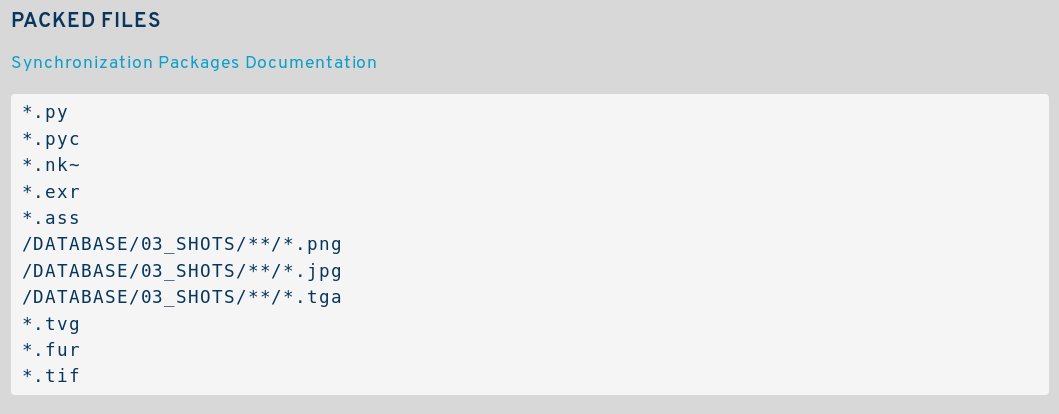 If these patterns match, the files will be hidden from the indexation but the parent folder of the file(s) will be indexed instead, as a package (with a trailing slash).
Detection of modifications inside packages
The scans can be configured to detect the modifications (sizes and modification times) of the files contained inside packages. This way, the package folder is marked as modified if some change happen to its content and can be automatically propagated. See detection pattern rules.