Logs
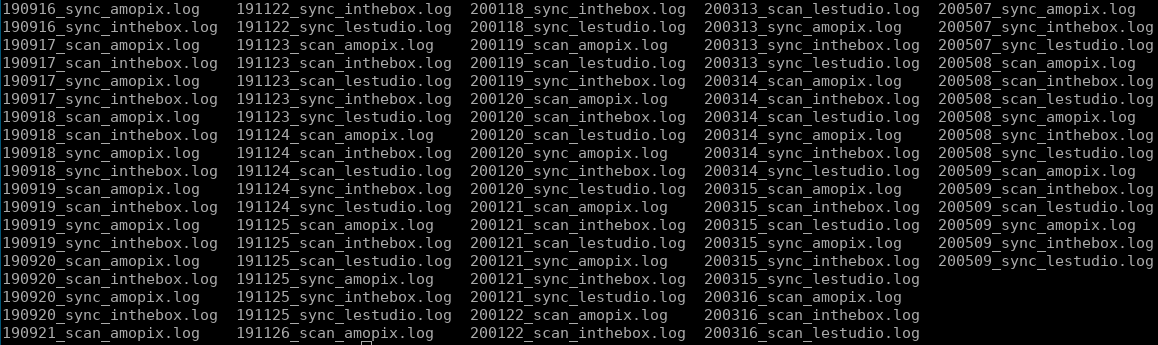
The SyncPlanet service status and actions are stored on disk as readable text log files.
error.logA single file chronologically storing the network status (connections and disconnections) and the file systems status for each connected volumes (with the type of the encountered error)Rsync transfer logs The rsync activity produced by
rsync --log-file, storing every file transfers made, as text files. Organized by date, volume names and direction, to ease reading and analysis. They are useful to view and debug the activity of a link, its bandwidth, to track a file and deliveries.
Note
Approximately 2GB of logs will be created in total (a few tens MB once compressed) for a 2 years long project with 4 synchronized volumes.
Log Files Location
Depending on your configuration, the log files will be located in the system's folders under /var/log/syncplanet or in the synchronized project folders under the {PROJECT_ROOT}/.syncp/log folder. The log files are generated on the machine where the SyncPlanet agents are running.
Rsync Transfer Logs
Rsync Transfer Log File Naming Convention
The transfer log files are organized using the current date, the volume's name and the direction as file name:
<date>_<volume>_<direction>.log
200514_lestudio_up.log
│ │ │  │        └── direction
│ │ │  └── volume's name
│ │ └── day 2 digits
│ └── month 2 digits
└───── year 2 digits
Using shell format:
$(date +%y%m%d)_${volume}_${direction}.log
Rsync Transfer Log Files Contents
Here is a piece of the 200514_lestudio_up.log log file:
2020/05/14 06:23:04 [9055] building file list
2020/05/14 06:23:04 [9055] 8 files to consider
2020/05/14 06:23:04 [9055] .d..t...... 2018-10_MICE_NUKE/COMPOS/SEQ035/SH0025/COMP/WIP/
2020/05/14 06:23:04 [9055] <f+++++++++ 2018-10_MICE_NUKE/COMPOS/SEQ035/SH0025/COMP/WIP/mice_comp_seq035_sh0025_take004_001_mhd.nk
2020/05/14 06:23:04 [9055] <f+++++++++ 2018-10_MICE_NUKE/COMPOS/SEQ035/SH0025/COMP/WIP/mice_comp_seq035_sh0025_take004_001_usr.nk
2020/05/14 06:23:04 [9055] sent 25,354 bytes  received 57 bytes  50,822.00 bytes/sec
2020/05/14 06:23:04 [9055] total size is 74,367  speedup is 2.93
2020/05/14 06:51:30 [16925] building file list
2020/05/14 06:51:30 [16925] 1248 files to consider
2020/05/14 06:51:30 [16925] .d..t...... 2018-10_MICE_NUKE/COMPOS/SEQ035/SH0023/COMP/
2020/05/14 06:51:30 [16925] cd+++++++++ 2018-10_MICE_NUKE/COMPOS/SEQ035/SH0023/COMP/PUBLISH/
2020/05/14 06:51:30 [16925] cd+++++++++ 2018-10_MICE_NUKE/COMPOS/SEQ035/SH0023/COMP/PUBLISH/001/
2020/05/14 06:51:30 [16925] <f+++++++++ 2018-10_MICE_NUKE/COMPOS/SEQ035/SH0023/COMP/PUBLISH/001/mice_comp_seq035_sh0023_take002_001_mhd.nk
2020/05/14 06:51:30 [16925] .d..t...... 2018-10_MICE_NUKE/COMPOS/SEQ035/SH0027/COMP/
2020/05/14 06:51:30 [16925] cd+++++++++ 2018-10_MICE_NUKE/COMPOS/SEQ035/SH0027/COMP/PUBLISH/
2020/05/14 06:51:30 [16925] cd+++++++++ 2018-10_MICE_NUKE/COMPOS/SEQ035/SH0027/COMP/PUBLISH/001/
2020/05/14 06:51:30 [16925] <f+++++++++ 2018-10_MICE_NUKE/COMPOS/SEQ035/SH0027/COMP/PUBLISH/001/mice_comp_seq035_sh0027_take002_001_mhd.nk
2020/05/14 06:51:30 [16925] .d..t...... DATABASE/03_SHOTS/SEQ014B/SH0022/10_RND/01_RENDERS/
2020/05/14 06:51:30 [16925] cd+++++++++ DATABASE/03_SHOTS/SEQ014B/SH0022/10_RND/01_RENDERS/REFLECTION_MASK_02/
2020/05/14 06:51:30 [16925] cd+++++++++ DATABASE/03_SHOTS/SEQ014B/SH0022/10_RND/01_RENDERS/REFLECTION_MASK_02/beauty/
2020/05/14 06:51:30 [16925] <f+++++++++ DATABASE/03_SHOTS/SEQ014B/SH0022/10_RND/01_RENDERS/REFLECTION_MASK_02/beauty/REFLECTION_MASK_02_beauty_1001.exr
2020/05/14 06:51:30 [16925] <f+++++++++ DATABASE/03_SHOTS/SEQ014B/SH0022/10_RND/01_RENDERS/REFLECTION_MASK_02/beauty/REFLECTION_MASK_02_beauty_1002.exr
2020/05/14 06:51:31 [16925] <f+++++++++ DATABASE/03_SHOTS/SEQ014B/SH0022/10_RND/01_RENDERS/REFLECTION_MASK_02/beauty/REFLECTION_MASK_02_beauty_1003.exr
2020/05/14 06:51:31 [16925] <f+++++++++ DATABASE/03_SHOTS/SEQ014B/SH0022/10_RND/01_RENDERS/REFLECTION_MASK_02/beauty/REFLECTION_MASK_02_beauty_1004.exr
2020/05/14 06:51:31 [16925] <f+++++++++ DATABASE/03_SHOTS/SEQ014B/SH0022/10_RND/01_RENDERS/REFLECTION_MASK_02/beauty/REFLECTION_MASK_02_beauty_1005.exr
2020/05/14 06:51:31 [16925] <f+++++++++ DATABASE/03_SHOTS/SEQ014B/SH0022/10_RND/01_RENDERS/REFLECTION_MASK_02/beauty/REFLECTION_MASK_02_beauty_1006.exr
...
2020/05/14 06:52:22 [16925] <f+++++++++ DATABASE/03_SHOTS/SEQ067/SH0028/10_RND/01_RENDERS/OLD/N/PARTICLES_N_1162.exr
2020/05/14 06:52:22 [16925] <f+++++++++ DATABASE/03_SHOTS/SEQ067/SH0028/10_RND/01_RENDERS/OLD/N/PARTICLES_N_1163.exr
2020/05/14 06:52:22 [16925] <f+++++++++ DATABASE/03_SHOTS/SEQ067/SH0028/10_RND/01_RENDERS/OLD/N/PARTICLES_N_1164.exr
2020/05/14 06:52:22 [16925] <f+++++++++ DATABASE/03_SHOTS/SEQ067/SH0028/10_RND/01_RENDERS/OLD/N/PARTICLES_N_1165.exr
2020/05/14 06:52:22 [16925] <f+++++++++ DATABASE/03_SHOTS/SEQ067/SH0028/10_RND/01_RENDERS/OLD/N/PARTICLES_N_1166.exr
2020/05/14 06:52:22 [16925] sent 591,951,568 bytes  received 23,103 bytes  11,064,947.12 bytes/sec
2020/05/14 06:52:22 [16925] total size is 656,568,648  speedup is 1.11
To understand the format used, please look at rsync manual page or this thread: https://stackoverflow.com/questions/4493525/what-does-f-mean-in-rsync-logs#12037164
Another example, sync_190617_feitong.log contains the details for the last file sent by Feitong:
2019/06/20 13:37:46 [32265] receiving file list
2019/06/20 13:37:47 [32265] 6 files to consider
2019/06/20 13:37:47 [32265] delta-transmission enabled
2019/06/20 13:41:19 [32288] >f.st...... To_Publish/FG/Shot/Shot/Layout-Line/109s2740.psd
2019/06/20 13:41:20 [32288] total: matches=1217 hash_hits=57354 false_alarms=0 data=2242054
2019/06/20 13:41:20 [32288] sent 13,250 bytes received 1,038,733 bytes 4,792.63 bytes/sec
2019/06/20 13:41:20 [32288] total size is 4,879,709 speedup is 4.64
The last transfer was 4,7KB/s (which is very slow and maybe needs an action to be improved).
More explanation (in french language)
Analysons le contenu d'un fichier de log. Il contient ces 2 premières lignes:
2023/02/06 00:01:26 [778698] building file list
2023/02/06 00:09:06 [778698] sent 13899793 bytes  received 22841 bytes  total size 379758698250
La première itération de ce jour à eu lieu à minuit 1 minute et 26 secondes. rsync commence par construire une liste de fichiers présents à la source et à la destination (building file list). 7 minutes plus tard, il a fini l'analyse et écrit directement son rapport car la comparaison de ces listes avec les options spécifiées n'a pas déclenché d'action. Les prochaines itérations ont lieu toutes les 8 minutes environ, pour une durée similaire, toujours sans transfert de fichiers:
2023/02/06 00:20:40 [781381] building file list
2023/02/06 00:28:18 [781381] sent 13900321 bytes  received 23369 bytes  total size 379758698250
2023/02/06 00:39:37 [784064] building file list
2023/02/06 00:48:54 [784064] sent 13900165 bytes  received 23213 bytes  total size 379758698250
2023/02/06 00:58:58 [786747] building file list
2023/02/06 01:06:37 [786747] sent 13899773 bytes  received 22821 bytes  total size 379758698250
2023/02/06 01:17:49 [789430] building file list
2023/02/06 01:25:55 [789430] sent 13899733 bytes  received 22781 bytes  total size 379758698250
2023/02/06 01:36:44 [792113] building file list
2023/02/06 01:45:33 [792113] sent 13899441 bytes  received 22489 bytes  total size 379758698250
[...]
Les premières actions sur le receveur ont été déclenchées par l'itération qui a démarré à 5h08 (heure GMT). Ces actions ont été faites:
- la création d'un dossier
pub/3d/asset/chr/fourmi-General/shd/unreal/export/w008/ - la copie d'un nouveau fichier
chr_fourmi-General_material_instances.jsondans ce dossier - la copie d'un nouveau fichier
prp_chaiseBebe-A_rig_lo_r008.mbdans un dossier existantpub/3d/asset/prp/chaiseBebe-A/rig/maya/
2023/02/06 05:08:46 [821716] building file list
2023/02/06 05:09:08 [821716] cd+++++++++ pub/3d/asset/chr/fourmi-General/shd/unreal/export/w008/
2023/02/06 05:09:08 [821716] <f+++++++++ pub/3d/asset/chr/fourmi-General/shd/unreal/export/w008/chr_fourmi-General_material_instances.json
2023/02/06 05:09:19 [821716] <f+++++++++ pub/3d/asset/prp/chaiseBebe-A/rig/maya/prp_chaiseBebe-A_rig_lo_r008.mb
2023/02/06 05:16:44 [821716] sent 14049019 bytes  received 22807 bytes  total size 379759369159
À 8:01, nous avons des actions similaires, puis nous avons un fichier pour lequel est spécifié <f..t......: il a été mis à jour sur le receveur car sa date mtime (t, son timestamp) a été modifiée, puis pour un autre fichier <f.st......: il a été mis à jour car sa taille (s, size) et sa date ont changé:
2023/02/06 08:01:47 [846943] building file list
2023/02/06 08:01:52 [846943] cd+++++++++ pub/3d/asset/bnk/brinHerbe-A/shd/
2023/02/06 08:01:52 [846943] <f+++++++++ pub/3d/asset/bnk/brinHerbe-A/shd/bnk_brinHerbe-A_shd_r001.png
2023/02/06 08:02:02 [846943] cd+++++++++ pub/3d/asset/bnk/sapin-A/shd/
2023/02/06 08:02:02 [846943] <f+++++++++ pub/3d/asset/bnk/sapin-A/shd/bnk_sapin-A_shd_r001.png
2023/02/06 08:02:10 [846943] cd+++++++++ pub/3d/asset/chr/fourmi-General/shd/unreal/export/w013/
2023/02/06 08:02:10 [846943] <f+++++++++ pub/3d/asset/chr/fourmi-General/shd/unreal/export/w013/chr_fourmi-General_material_instances.json
2023/02/06 08:02:12 [846943] <f..t...... pub/3d/asset/chr/meme-var/shd/unreal/export/w004/chr_meme-var_material_instances.json
2023/02/06 08:02:35 [846943] <f.st...... pub/3d/asset/set/DesertRencontreNuageExt/rig/maya/set_DesertRencontreNuageExt_rig_r001.ma
2023/02/06 08:07:19 [846943] cd+++++++++ pub/3d/sequence/sq0590/lay/
2023/02/06 08:07:19 [846943] cd+++++++++ pub/3d/sequence/sq0590/lay/maya/
2023/02/06 08:07:20 [846943] <f+++++++++ pub/3d/sequence/sq0590/lay/maya/sq0590_lay_r002.ma
2023/02/06 08:07:20 [846943] <f+++++++++ pub/3d/sequence/sq0590/lay/maya/sq0590_lay_sh0110_r002.mov
2023/02/06 08:07:20 [846943] <f+++++++++ pub/3d/sequence/sq0590/lay/maya/sq0590_lay_sh0112_r002.mov
2023/02/06 08:07:20 [846943] <f+++++++++ pub/3d/sequence/sq0590/lay/maya/sq0590_lay_sh0114_r002.mov
2023/02/06 08:07:20 [846943] <f+++++++++ pub/3d/sequence/sq0590/lay/maya/sq0590_lay_sh0120_r002.mov
2023/02/06 08:11:34 [846943] sent 33986231 bytes  received 23780 bytes  total size 379946073466
Transmissions des journaux sur les autres volumes connectés
Ces fichiers sont générés sur le serveur où les commandes rsync sont executées, et peuvent être transmis, comme les autres fichiers du projet, vers les volumes distants ayant besoin d'accéder aux journaux. Ces règles de filtrage rsync pourront être utilisées pour transmettre les logs vers le volume voulu:
+ /.syncp/
+ /.syncp/log/
+ /.syncp/log/**
Il est possible de ne sélectionner qu'un partie des logs en affinant la règle de filtrage (en fonction d'un nom de volume, d'une direction etc)
Making Charts
Extracting the data from the rsync transfer logs can be interesting to build charts. Here are examples built to show the synchronizations uploads for the production of the movie Angelo dans la forêt mystérieuse
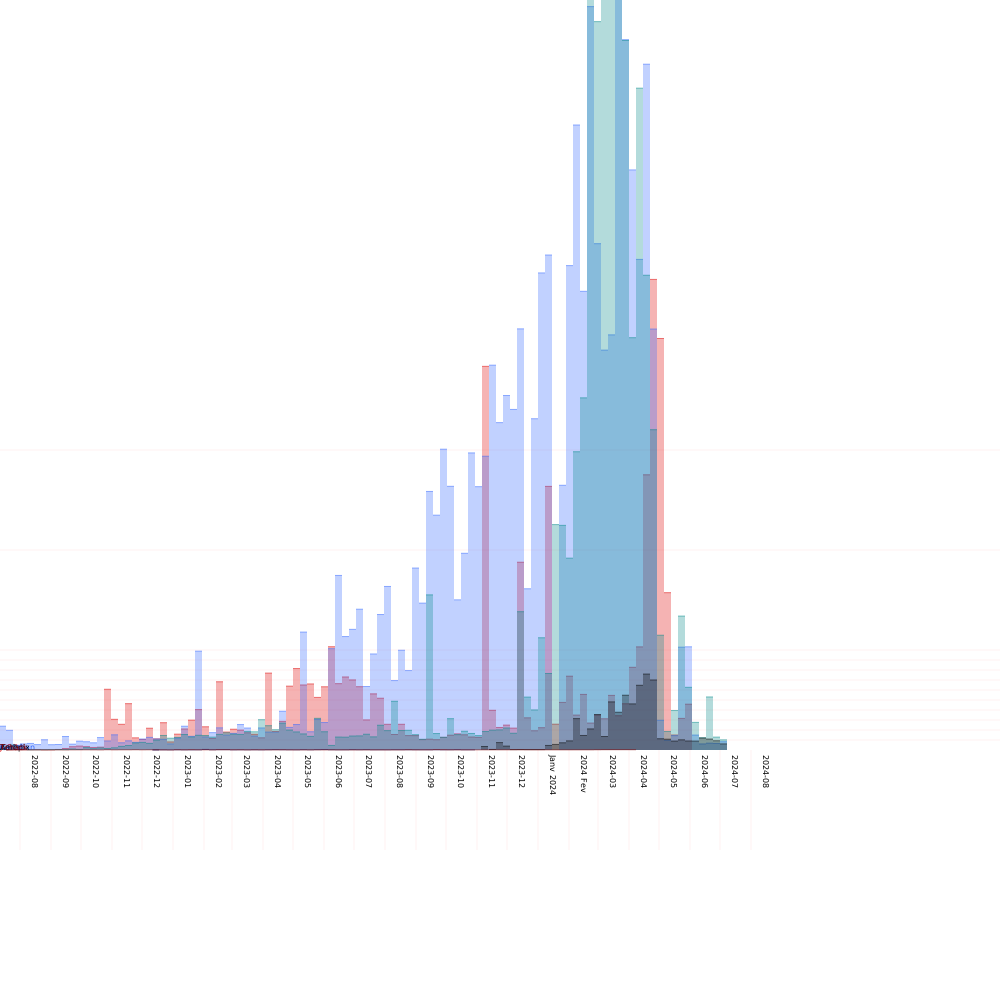
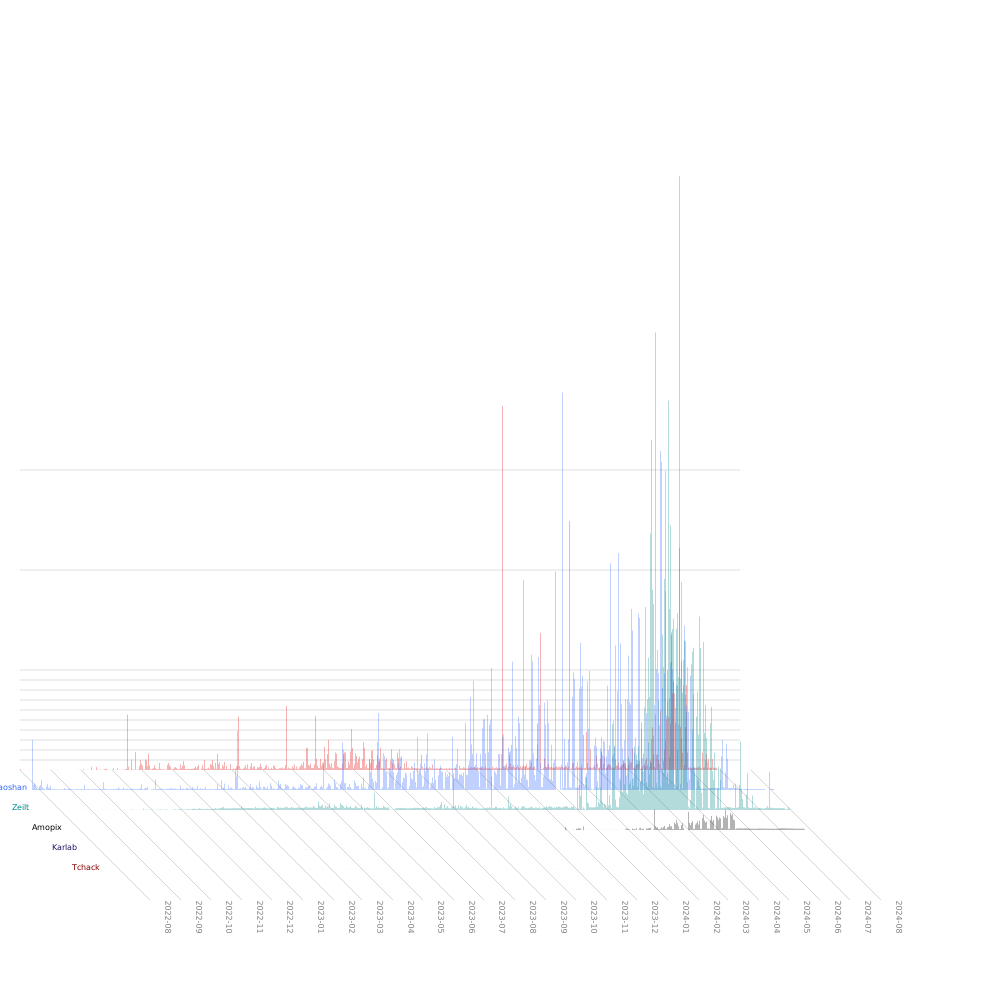 You can contact support@syncplanet.io if such charts and the scripts used to generate them can be useful for your projects.