Table of contents
Synchronisation Channel
A sync channel is a set of instructions to unidirectionally synchronise some files between a hub and one of its connected storage using rsync. It consists of:
- A filter, to make a selection of the folders and the files concerned,
- Options, to analyse the files and to control the transfers when some differences are found between the source and the destination.
Multiple channels can be defined per storage. They are processed sequentially (not at the same time) one after the other by a sync agent. A sync agent is an independent process, dedicated to a storage, ran in parallel, one for each storage. This way, we achieve a multi-directional, asynchronous synchronisation experience, hot-plugging storages, and fault-tolerant (meaning that a storage going offline doesn't interfere with the others storages).
Creation and Access
The easiest way to create a new channel is to open the channels explorer under the storage from/to which you would like to upload/download files, and click on the Add button. A menu then proposes 2 buttons: Upload and Download to create a new channel to transfer files from the storage to the hub or from the hub to the storage, respectively.
Note
Another way to create new channels for advanced users and programmers is to use the API.
To access an existing channel, simply click on its name in the channels explorer.
Overview
A Channel page is divided into four tabs:
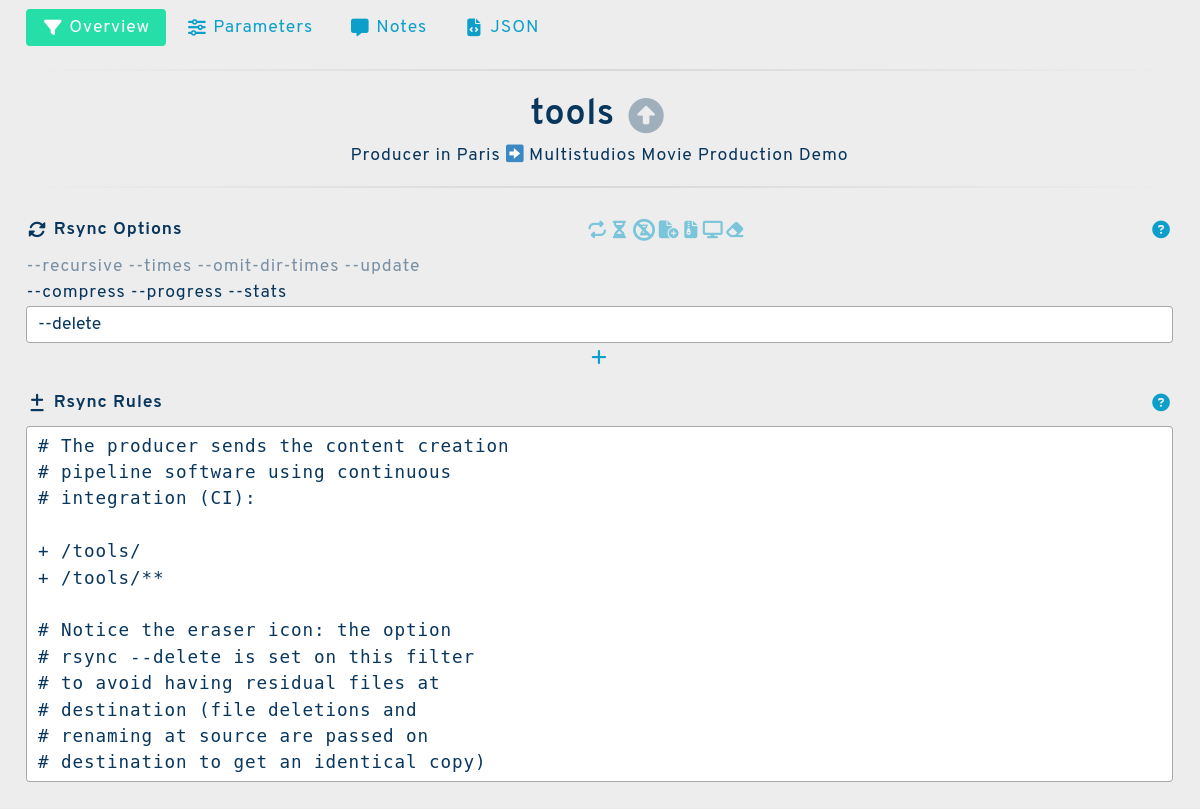
Channel main tab
The main tab of a channel's graphical user interface is divided into 3 sections:
Title bar
This contains the name of the channel as well as information regarding the production it belongs to.
For further information regarding the name, please see below.
- Shows the activity and direction of the channel. An up arrow shows an upload (the storage is sending to the hub), a down arrow shows a download (the storage is receiving). A blinking arrow indicates that the channel synchronisation is in progress.
Rsync Options
You can control many aspects of the file transfer using rsync options and filter rules. The options specified on a channel affect only this channel. In the following example below the --delete option is defined to clean the destination from unwanted files.
# The option: rsync --delete is set (see the
# eraser icon) to have an identical copy at
# destination (local file deletion and
# renaming at source are passed on
# destination)
Please see the rsync page for more details about the available options.
Rsync Rules
Rules are written using the rsync syntax to include or skip files and folders:
# The producer sends the software for the
# pipeline in continuous integration (CI):

+ /tools/***
Please see the rsync filters page for more details about the syntax and how rule filters work in SyncPlanet.
Channel Parameters
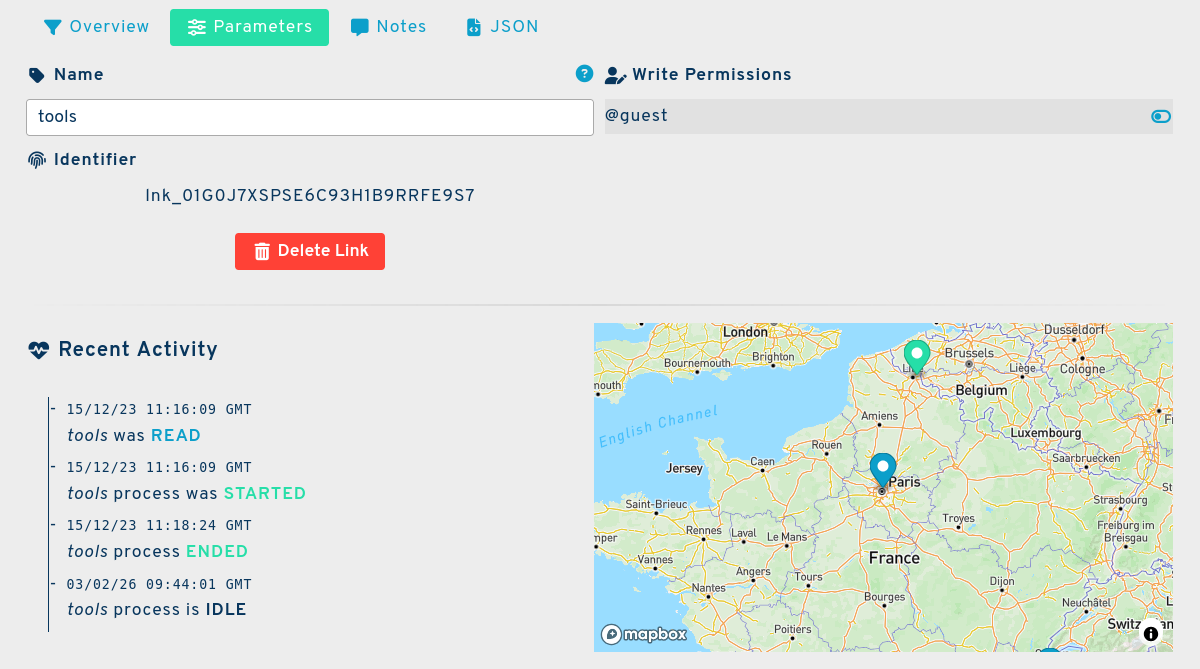
The parameters tab of a channel's graphical user interface is divided into 5 sections:
Name
A longer name, often the real long name with no size limit.
Tip
Example:
tools
Identifier
An automatically generated string to identify the link of the form: lnk_# where # is a Universally Unique Lexicographically Sortable Identifier .
Tip
Example
lnk_01G0J7XSPSE6C93H1B9RRFE9S7
Write Permissions Table
SyncPlanet is meant to be used by multiple users. This list contains all the users authorised to write and update an object. Developers can access the permissions table under the author key which can have a single user string value or have multiple user names in an array of username strings.
Note
If a user is not listed in the table, it means that you must first connect them to the project
Status
The status shows informations on links to know when the last run happened as well as its duration. It also shows any possible errors encountered in the process.
Map
This shows the real world location of the storage the channel is linked to.
Notes
This tab is used for personal notes regarding the channel.
JSON
This is the programming interface for the channel.
{
"_id": "lnk_01G0J7XSPSE6C93H1B9RRFE9S7",
"author": "support",
"enable": true,
"include": "# The producer sends the software for the\n# pipeline in continuous integration (CI):\n\n+ /tools/\n+ /tools/**\n\n# The option: rsync --delete is set (see the\n# eraser icon) to have an identical copy at\n# destination (local file deletion and\n# renaming at source are passed on\n# destination)",
"name": "tools",
"rsync_args": "--delete",
"src_id": "vol_01FWEWD03P3J2H98TQ0Y4AXF3H",
"tgt_id": "hub_01FX33ZYB78E9F5FTZMKC96A4P",
"time": 1649879738073,
"timeBegin": "2023-12-15 11:16:09+00:00",
"timeEnd": "2023-12-15 11:18:24+00:00",
"timeRead": "2023-12-15 11:16:09+00:00"
}
_id: String - the identifier of the channel. Channels identifiers start withlnk_to ease selection and recognitionauthorArray of Strings - people (usernames) allowed to edit the channel. Equivalent to the Write Permissions TableenableBoolean - equivalent to the (True) and (False) in the interfaceinclude- String - rsync filtersname- String - The system namersync_args- String - The channel's specific rsync optionssrc_idString - the identifier of the source element (origin) of the files. It could be a hub or a storagetgt_idString - the identifier of the target element to receive the files. A hub or a storage
Note
To create a link, specify "lnk_{#}" as _id key to generate a unique and sortable ulid identifier statring with lnk_
Some additional keys are added and updated by the synchronisation process:
{
"time": 1649879738073,
"timeBegin": "2023-12-15 11:16:09+00:00",
"timeEnd": "2023-12-15 11:18:24+00:00",
"timeRead": "2023-12-15 11:16:09+00:00"
}
timeNumber - the time at creation (epoch format)timeBeginString - The time when the synchronisation agent starts processing the channel (useful for stats)timeEndString - The time when the synchronisation agent finishes processing the channeltimeReadString - The time when the synchronisation agent reads the element (to process it or not if it is not enabled)
For more information about the API please see Environment-Setup and API
Next
Further reading:
- Try the demo channel,
- Check the documentation on storages,
- Find out about the hubs.