Table of contents
Data Flow
SyncPlanet is designed to transfer large amounts of data between remote servers, but how does it all work? What does a typical use case look like? In this article, we will give you a general overview of the most common scenarios for data transfers and scopes, and how to understand them.
Introduction
Projects in SyncPlanet work using a tree structure of directories and files, or folder tree. This structure is shared accross each studio where your different teams work and interact with the files on their own local storage.
We use channels to describe how the data is propagated accross the connected storages, including its direction. Channels have filters and numerous possible options. We can configure an unlimited number of channels with different options and different propagation methods for each aspect of the folder tree and the workflow / taskflow of the project.
Flow Types
Depending on your project's requirement and your channels configuration, you are likely to encounter at least one of four types of data flow, divided in two main categories:
Tip
Flow types may impact scopes. For further information about scopes, see the relevant section.
Unidirectional Flows
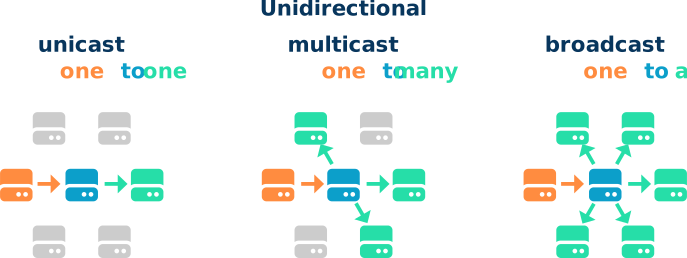
In this first type of data flow, files are only propagated one way. Once channels have been configured to be unidirectional, propagation will work according to the following logic:
- Files created on the emitter storage will flow to the hub and then to the receiver storage(s).
- Files modified on the emitter storage will flow using the same logic, replacing their obsolete versions on the hub and the receiver storage(s).
Tip
Only files that are included by the filters will be transmitted.
File deletion
By default, files that were deleted or renamed on the emitter storage will remain unchanged on the hub and the receiver storage(s). Files that were renamed will be considered to be new files by the system and appear alongside their original.
Any file deleted on the hub or the receiver storage(s) but not on the emitter will reappear during the next synchronisation.
To properly propagate a file deletion, use the delete option. To rename a file, use the delete option on the old filename. This way, the emitter storage can clean the folders, removing and renaming files and the modifications are propagated to the hub then to the receiver(s).
For more information on how to handle files, please see our guide on file management
Multidirectional Flows
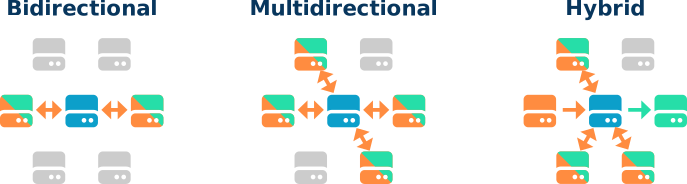
In multidirectional flows, a same folder can be edited by multiple sources. Files created on a linked storage unit are propagated to the hub and then to the rest of the relevant storage units. In essence this means that a file can be created on one unit, modified on another, and all modifications will be propagated to all the relevant storage units, including the original emitter storage.
Note
The use of the --update option is mandatory. This ensures that when rsync encounters 2 different versions of the same file (with the same path) the most recent file with the most recent mtime is kept (the systems time running the storages must be configured properly).
Note
Using the --delete option is not possible in multidirectional modes. It is however possible to clean up directories using a specific procedure outline in the file management guide.
Bidirectional flows
A bidirectional flow is simply a flow using only two storage units and a hub but where the two storage units can act as both emitter and receiver.
Real multidirectional flows
This refers to flow types with more than two connected storage units and a hub. In this type, every unit can act as both emitter and receiver.
Hybrid flows
This refers to flow types with more than two connected storage units and a hub. Unlike the real multidirectional flow type, in hybrid mode, some storage units act only as receiver or emitter, while others can assume both roles.
Next
Further reading:
- Learn how to navigate the interface.
- Learn how to set up a hub.
- Learn about the terminology used in SyncPlanet.